Updates
Updating current toolkit release
Toolkit v2
As of version 5.6.1 of Domino, we have introduced version 2 (v2) of the toolkit. Prior to this version, the toolkit was available as version 1 (v1).
Note
The toolkit version is not tied to the Domino release. If you’re currently using v1 of the toolkit, you can update it to v2, regardless of the Domino version you’re using.
Details of the changes introduced in v2 can be found in the Domino Data Lab documentation changelog.
Details of how to upgrade from v1 to v2 of the toolkit can be found in the upgrade section below.
Update the toolkit
The toolkit can be updated independently of the Domino version deployed. In the toolkit web interface, click on the Updates tab and then on the Check for updates button to check for a new toolkit Docker image.
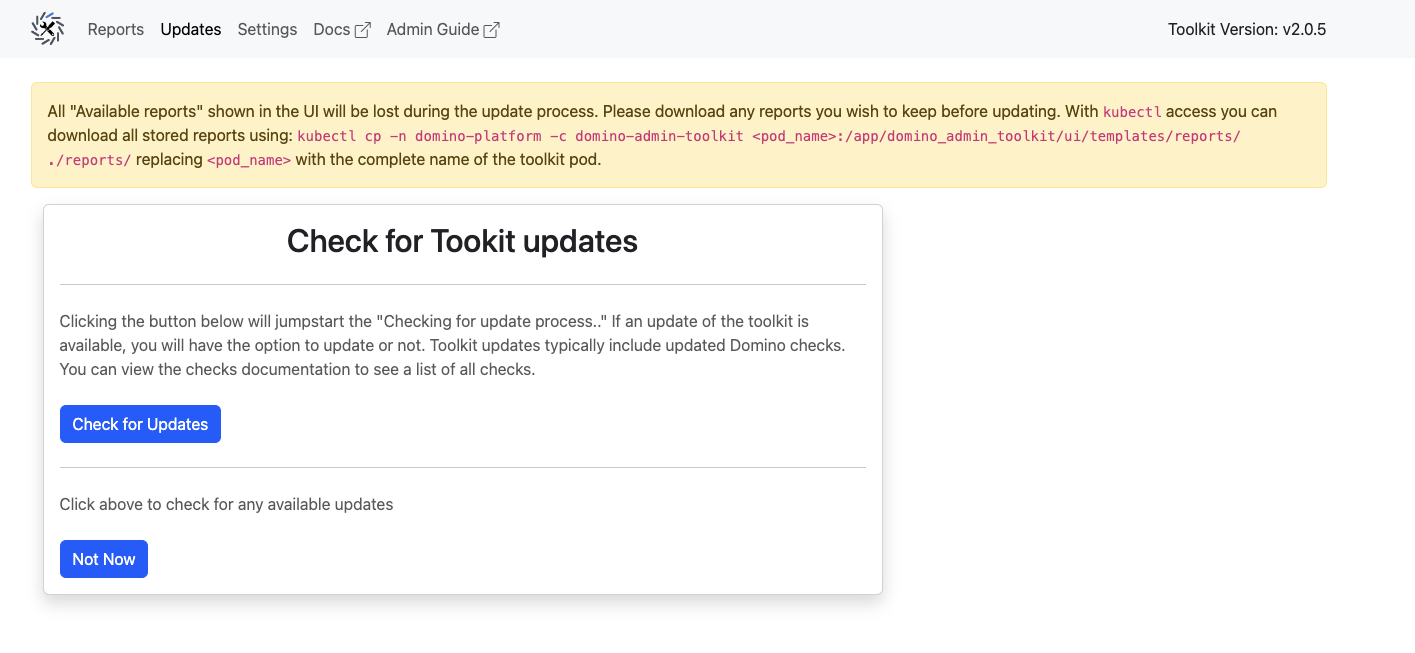
Or run the following cli commands
./toolkit stop && ./toolkit start
Note
The update options above only update you to the latest version of the toolkit version you are currently running.
Installing, uninstalling, and upgrading the toolkit
Prerequisites
Kubernetes version compatibility There are some breaking changes in Domino admin toolkit v2 that require a minimum Kubernetes version of 1.18 or later.
Table 1 Compatibility matrix for Kubernetes and toolkit versions Kubernetes version
Toolkit v1
Toolkit v2
<= 1.17
YES
NO
>= 1.18
YES
YES
A deployment of Domino 4.x or newer. This version of the toolkit does not run on Domino 3.x or older.
Administrative access to the Kubernetes cluster that hosts Domino.
The Kubernetes control plane must be working so that the toolkit can interrogate the Kubernetes API server.
A bastion host, laptop, or other host running a Unix-like OS with kubectl access that has network connectivity to the target Kubernetes cluster.
Note
We highly recommend updating to our latest v2 toolkit version to ensure the best performance, latest features, and system checks. Some features of the toolkit, such as automatic upgrading or automatic uploading of scan reports, require an internet connection from the Kubernetes cluster.
Install the toolkit
The toolkit is installed automatically by the Domino installer.
You can also install the toolkit using the toolkit CLI script as follows:
./toolkit.sh install
If there is a legacy version of the toolkit installed and running in the cluster, the v2 toolkit.sh detects it and prompts you to uninstall it before installing the new version.
The install command also accepts the --no-ingress option that installs the toolkit with the /toolkit ingress route disabled. When installed with this option, it is not possible to use the web interface and only the CLI can be used to operate the toolkit.
Uninstall the toolkit
./toolkit.sh uninstall
This completely removes all Kubernetes resources associated with the toolkit. Any reports still on the toolkit’s pod storage are deleted.
Note
The toolkit comes installed by default with Domino 5.5 and later. If you uninstall the toolkit, it is reinstalled the next time you run fleetcommand-agent.
Upgrade from v1 to v2
For a detailed list of changes from v1 to v2, see the 5.6.1 release notes.
curl -sSLO https://toolkit.re.domino.tech/toolkit.sh && chmod a+x ./toolkit.sh
./toolkit.sh uninstall
./toolkit.sh install
Air-gapped deployments or private image registries
Push the toolkit Docker image to your internal registry.
./toolkit.sh push internal-registry-host/domino-admin-toolkit
Install the toolkit:
./toolkit.sh install --image internal-registry-host/domino-admin-toolkit
Uninstall the toolkit:
./toolkit.sh uninstall --image internal-registry-host/domino-admin-toolkit
This completely removes all Kubernetes resources associated with the toolkit. Any reports still on the toolkit’s pod storage are deleted.
Update the toolkit:
In an air-gapped deployment you must use the ./toolkit.sh push command to manually push the latest version of the toolkit’s Docker image to your internal registry in order to enable the upgrade feature.
Upgrade from v1 to v2:
For a detailed list of changes from v1 to v2, see the 5.6.1 release notes.
./toolkit.sh push internal-registry-host/domino-admin-toolkit
curl -sSLO https://toolkit.re.domino.tech/toolkit.sh && chmod a+x ./toolkit.sh
./toolkit.sh uninstall --image internal-registry-host/domino-admin-toolkit
./toolkit.sh install --image internal-registry-host/domino-admin-toolkit